AI
Multimodal RAG for a Car Assistant: Why Captions Beat CLIP
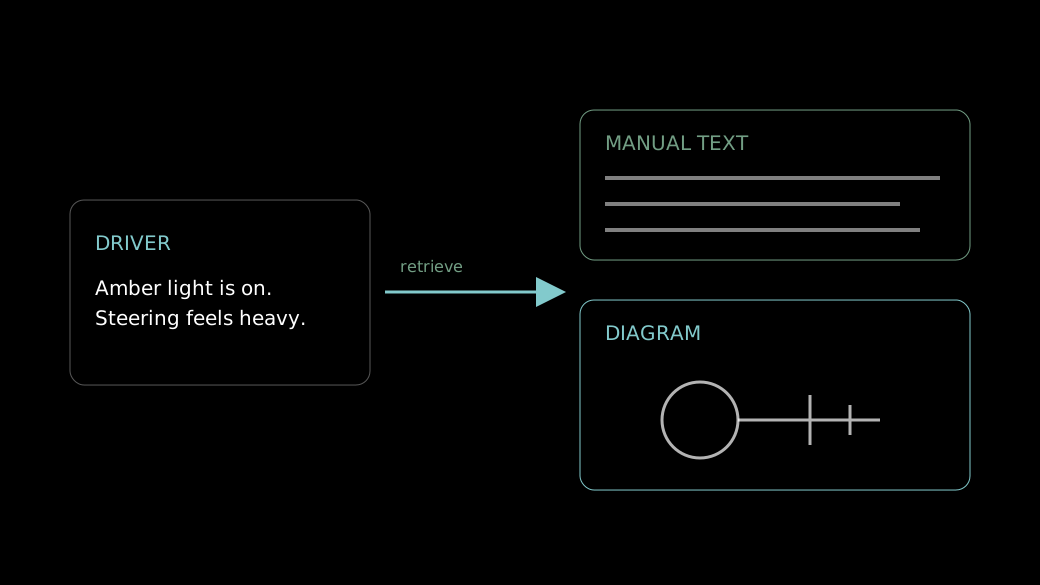
The amber light came on two minutes ago, you are on a dark highway, and the manual in the glovebox calls the symbol something you would never think to search for. A paper manual makes you guess the right word. A good assistant lets you describe what you see, then answers with the right paragraph and the diagram beside it.
A multimodal RAG (retrieval-augmented generation) car assistant retrieves text and images from a car catalog and repair manual, then uses them to answer a driver’s question. In our testing, captioning each image and searching the captions retrieved noticeably better than embedding the images directly with CLIP (Contrastive Language-Image Pre-training).
That holds with a catch. Captioning moves the problem rather than removing it: an image is only as findable as its caption, so a vague or wrong caption hides the right diagram.
What is multimodal RAG in a car assistant?
Retrieval-augmented generation fetches relevant passages from your own documents and hands them to a language model before it answers. Multimodal RAG extends this to images, so one question can return a repair step together with the exploded diagram or part photo it refers to.
The idea comes from the 2020 paper by Lewis and colleagues, Retrieval-Augmented Generation for Knowledge-Intensive NLP Tasks, which pairs a language model with an external, searchable document store. A car assistant has two such stores: the catalog, full of part names and part images, and the repair manual, full of procedures, dashboard symbols and diagrams. Text-only search drops every diagram. That is a real loss, because in a repair manual the picture often carries the answer. Our AI and engineering capabilities cover this kind of build.
How does the retrieval pipeline work end to end?
There are two paths. Ingestion runs once per document set; the query path runs on every question. Captioning sits in the ingestion path, which is why it adds no work when a driver asks something.
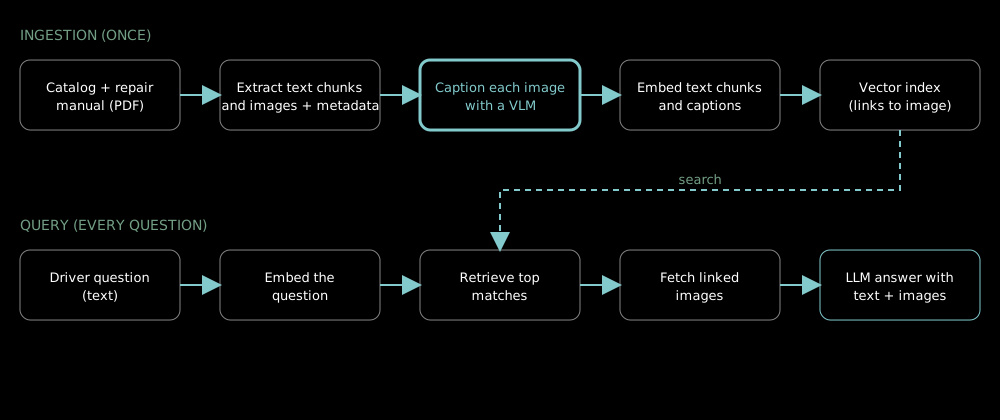
During ingestion, we parse the catalog and manual into text chunks and extract each image with its page and section metadata. A vision-language model captions each image. Text chunks and captions go through the same text embedding model and into one vector index, with each caption pointing back to its image file. At query time the question is embedded, the closest chunks and captions are retrieved, the linked images are fetched by metadata, and the language model writes the answer with the images attached. Whether to search text and images together or route each question to one index is a separate design choice, covered in our post on hybrid retrieval and query routing.
Why did CLIP fall short on car images?
In our build, CLIP retrieved poorly for the questions drivers actually ask. CLIP maps images and text into one shared embedding space, and according to its original 2021 paper by Radford et al., it was trained on 400 million image-text pairs collected from the internet.
Our working explanation, not a controlled test, has three parts. Manual pages are mostly line art, schematics and dashboard icons, which look unlike typical web photos. Drivers describe symptoms (“steering feels heavy”), not pictures. And many car parts differ only in small details.
Here is the case that showed it. We asked how to check the pressure in the tyres. CLIP returned tyre-pressure warning signs and generic tyre photos: related to the words, but useless for the task.
An image is only as findable as its caption.
Why did captioning improve retrieval?
Captioning turns the image into text, so the driver’s question and the content are compared in the same language. We sent each image to Gemini 3.5 Flash together with the manual text around it, so the caption could name what the picture shows in the vocabulary of that page.
The same tyre-pressure question then returned images of the pressure being checked with a tool, the step the driver needed. We used Gemini Embedding 2 for both captions and manual text, so they share one embedding space.
A second benefit is that you can read a caption. When retrieval misses, you open the caption and see why, which you cannot do with an image vector.
Captions also let one index serve both kinds of content. Manual paragraphs and image captions are embedded by the same text model, so a single search returns the repair step and the diagram together, without merging scores from two different embedding spaces. That matters because similarity scores from separate models are not directly comparable.
| Aspect | CLIP image embeddings | Captions + text embeddings |
|---|---|---|
| What is searched | Image vectors | Caption text, same index as manual text |
| Match to symptom-style questions | Weak in our build | Stronger in our build |
| Carries part names and warning-light names | Only if the model already knows them | Yes, from the prompt and the surrounding manual text |
| Debugging a miss | Hard; vectors are opaque | Read the caption |
| Ingestion cost | One embedding per image | One captioning call plus one embedding per image, done once |
| Main risk | Domain mismatch | Vague or wrong captions |
Captioning is not always the right call. If users search by uploading a photo, or the text already holds the full answer and the images only decorate it, skip it. We would not spend a client’s budget on captions that add nothing to retrieval.
How do you build captioned image retrieval?
- Extract text and images from every page. Output: text chunks and image files, each with page and section metadata.
- Write a caption prompt that names the domain: parts, symptoms, warning lights. Output: one prompt tested on a sample of images.
- Caption every image, passing the surrounding manual text as context. Output: one caption per image.
- Embed text chunks and captions with the same text model. Output: vectors in one index.
- Store each caption’s link to its image file. Output: a lookup from retrieved caption to displayable image.
- Test with real driver questions against a CLIP baseline. Output: a side-by-side hit-rate comparison.
Questions teams ask about captioned image retrieval
Is CLIP still useful in a multimodal RAG system?
It can be, particularly when the user searches with a photo. Text-to-image retrieval on technical diagrams is where it fell short for us. We did not test image-to-image search, so we cannot say how it would have performed there.
Which model should write the captions?
We used Gemini 3.5 Flash, giving it each image plus the surrounding manual text, and Gemini Embedding 2 for the embeddings. Any vision-language model that takes an image and a prompt can do the job. Test captions on your own diagrams, because quality varies by image type.
Is generating captions expensive?
Not much. Each image is captioned once, at ingestion, so the cost is a one-time model call per image and does not grow with the number of questions. You pay again only if you recaption. At query time you are searching text vectors, as in any text RAG.
How do you stop a caption inventing a part name?
Pass the surrounding manual text into the captioning prompt, and review a sample of captions against the source page before indexing at scale. A wrong caption makes an image findable for the wrong question.
What should you do before building a multimodal RAG assistant?
Test the image path before the rest of the system. Pick ten real questions and the pages that answer them, then check whether the right diagram comes back. Send us the manual and those questions through the contact form on our homepage. You get a read on whether captioned retrieval fits before anyone talks scope.
Sources & References
- Radford et al., “Learning Transferable Visual Models From Natural Language Supervision (CLIP)”, 2021.
- Lewis et al., “Retrieval-Augmented Generation for Knowledge-Intensive NLP Tasks”, NeurIPS 2020.